The calls you keep making alone
The coach reads your most recent run and helps you settle all four.
This run
What went well, what was a warning sign, and what kind of session it actually was
Where you are
Where your load and recovery stand right now
Next session
What and how much to run next
This week
Sessions, intensity and days rearranged Pro
Coaching is delivered in Korean. No device sync to set up — one photo and you're started.
Real coaching output
Verdict
이건 모범적인 이지런이에요 — 10km를 HR 118~146의 낮고 안정적인 심박으로 균일하게 돌았고, 계획 11km에 거의 맞춘 거리라 오랜만에 계획대로 소화했습니다.
A textbook easy run — 10 km held at a low, steady 118–146 bpm, and at almost exactly the 11 km you had planned. First time in a while you ran the plan as written.
Signal worth noting
늘 이지런을 중강도로 끌어올리던 당신이 오늘은 심박을 130대에 눌러둔 게 가장 반가운 변화예요. 다만 부하는 아직이에요. ACWR이 1.54에서 1.63으로 다시 올라왔습니다.
You usually let easy runs drift into moderate; today you kept your heart rate in the 130s, and that is the most encouraging change here. The load, though, is not there yet — ACWR climbed again, 1.54 to 1.63.
Next action
오늘처럼 낮은 강도를 며칠 더 유지하거나 하루 완전 휴식을 섞어 ACWR을 1.2 아래로 마저 내리세요.
Hold this low intensity for a few more days, or fold in one complete rest day, and bring ACWR the rest of the way below 1.2.
What it read
10 km · HR 118–146 · 11 km planned
What it found
Easy intensity held, but weekly load rising
What to do
Stay easy a few days, or take one full rest day
Not a summary. It runs through to what went well · what to watch · what to do next.

How it works
1
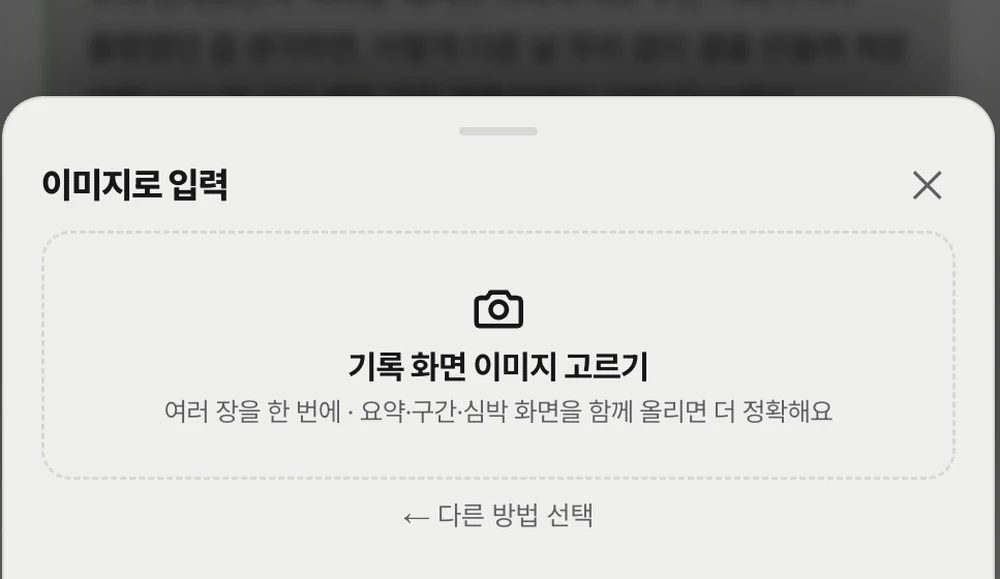
Distance, pace, heart rate — and laps when they are visible. Several photos merge into one run, and a single activity-list screenshot brings past runs in all at once. Per-device detail is in the FAQ.
2
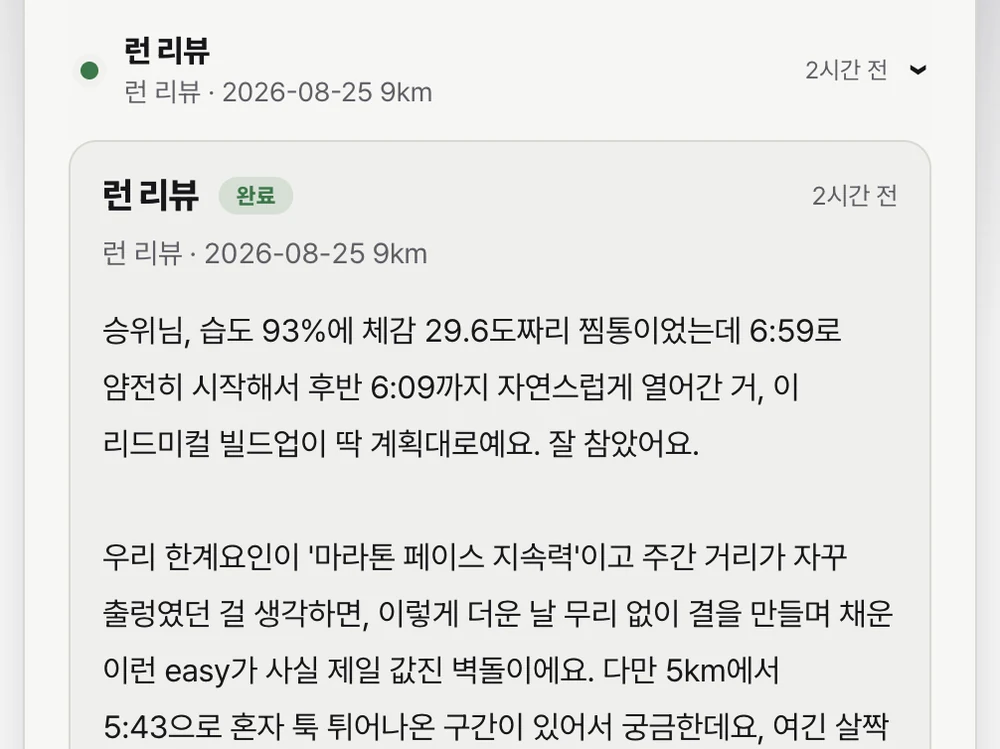
It does not look at that one run alone. The runs around it, your recent load, your goal and this week's plan go on the table together. It only ever speaks on top of your own logs.
3
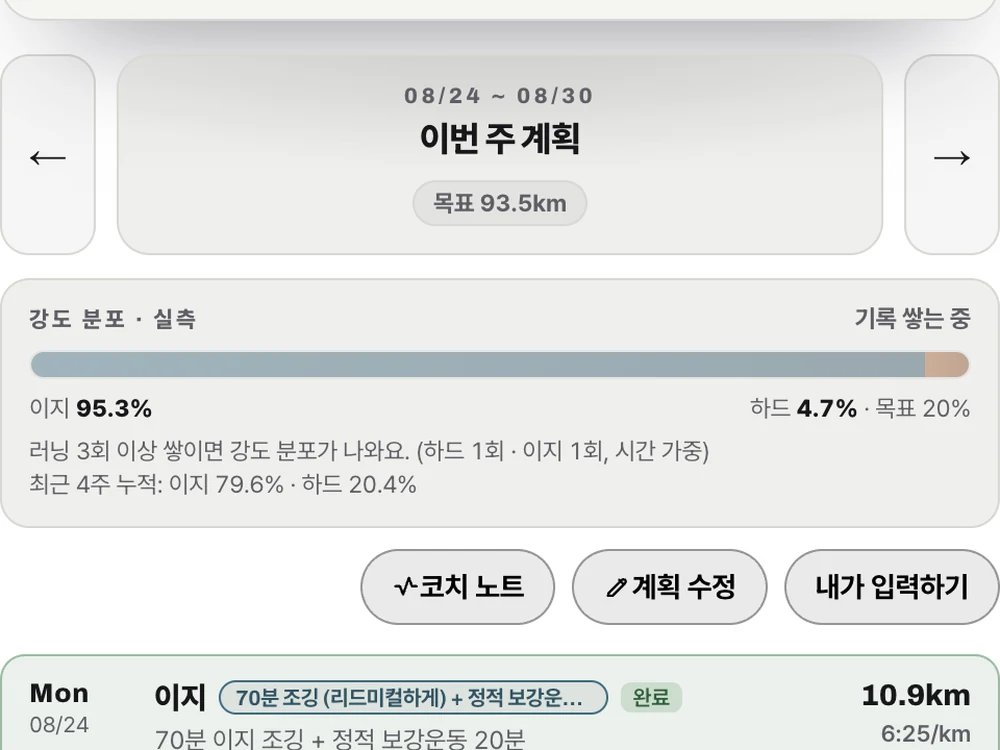
It puts forward a plan with sessions, intensity and days adjusted. You can just say “move the long run to Saturday”. Nothing changes until you confirm it. Pro
As logs accumulate
From one log
Once logs accumulate
Every screen below is computed by code; the AI only lays interpretation on top.

Four-week briefing
The last four weeks on one screen — what went up, what went down.

Long-term volume
Weekly load and years of monthly volume on the same axis.

Race prediction
5 km through marathon — a range, never a single number.

Injury and rehab
Your recovery stage sets that week's volume ceiling.
Why you can trust it
ACWR · intensity distribution · efficiency · condition index · race prediction — the AI explains what these mean. It does not invent them.
Enforced by code
Only asked for
Never writing those two as the same verb is our rule. The only thing we can say is kept is what code keeps.

How is it computed? Training load (ACWR) is the last 7 days of distance including today, divided by the mean week of the previous 4. It is a published metric in the sports-science literature (Gabbett, BJSM 2016), and we read roughly 0.8–1.3 as the safe range, with rising caution above it. But individual variation is large — the same value reads differently by experience, session type and recovery — and the metric itself is debated, including how to compute it. So we use it only as a conservative reference signal. It does not establish an individual's injury risk and it is not a substitute for medical judgement.
What about watch heart-rate error? Load is computed from distance, not heart rate. Optical wrist HR can spike without moving ACWR. Heart rate is used only to classify intensity.
What if there isn't much data? Below 8 runs we don't talk about trends. You still get the review of this run and the proposal for the next one.
Real usage
Every time the training changes, the plan gets rebuilt with you.
Marathon goal 3:08 · around 70 km/week
Adjusted the weekly plan 33 times over four weeks as schedule and condition moved
Half-marathon goal 2:00 · started with 8 logs
Received 16 run reviews and 7 weekly reviews
Measured from real beta usage, 2026-08-24.
Pricing and the beta offer
Open beta
Everything is free during the beta. Day-by-day weekly plans, weekly reviews and plan editing are all open, and there is no card to register and nothing to pay.
It is time-limited — at general release the pricing below takes over.
Planned pricing after release
On sign-up
₩0
Day-by-day weekly plans, weekly reviews, plan editing — the Pro features as they are. No card, and nothing charges automatically when it ends.
And then, ongoing
₩0
Fitness assessment, today's session and coach chat all draw on those 5. Putting logs in and reading run reviews stays free and does not spend a turn.
PRO
₩9,900/mo planned
Day-by-day weekly plans, a week-in-review, writing the plan yourself, and coach comments on it. This is the figure we have in mind for general release.
This is advance notice of what changes before general release. Nothing will be charged without your consent.
No — the coaching is delivered in Korean. OMPB Coach was built for Korean marathon runners: the coach replies in Korean, and the app interface is Korean. This page exists so that non-Korean readers can understand what the product does. If you read Korean comfortably, everything here is available to you today; if not, the output will need translating.
Yes. Photograph the log screen on your watch or app and it reads distance, pace and heart rate, filling in per-lap splits when laps are visible. Several photos merge into a single run, and an activity-list screenshot brings past runs in all at once. What it read is shown on a confirmation screen before saving, so you can fix a wrong value first. Logs without laps stop at session averages rather than split analysis.
One recent run is enough for a first assessment. It places your current intensity from distance, pace and heart rate, and proposes what to do on the next run. Trends are a different matter — weekly load and the condition index need several weeks before they open. When that is the case the coach says what is missing rather than pretending to know.
From 8 runs the four-week performance view and insight cards open; 5 runs within the last 6 weeks brings the condition index. With a year of data it compares you against the same period last year. It deliberately does not read outside running — no sleep trackers, no stress, no work intensity — and body weight and the three-tap check-in count only as far as you report them.
Not yet, which is why it is built to work without it — watch or app screenshots, .fit files exported from Garmin or COROS, or a one-line entry like "10 km in 52 min yesterday". Strava stopped accepting new connections for us in July 2026, and COROS partner API approval is pending.
No. ACWR, intensity distribution, efficiency and the condition index are all computed by code. The AI does not produce those numbers; it explains what they mean for this block of training. So a wrong number is a code problem and a wrong reading is a prompt problem — not mixing those two up is a rule of this product.
It can help adjust training intensity, but it is not medical judgement. Please see a professional about pain and injury first. Rehab items are selected by body area and recovery stage; they are not a prescription written after examining you. That said, if pain or injury signs are present, or load is in the danger band, code blocks "push through" from coming back as an answer no matter which coach persona you pick.
No. Coaching is produced by inference over your own connected data only. We do not use it to train models and do not provide it to third parties for training purposes. The data needed to produce a response is sent to Claude.
Right now it is an open beta and everything is free — day-by-day weekly plans, weekly reviews and plan editing are all open, with no card and no payment. It is time-limited; at general release the conditions below return and we will tell you in advance. On sign-up everything opens for 7 days, and after that you get 5 coaching turns a month free. The fitness assessment draws on those 5, and putting logs in and reading them does not spend a turn. Day-by-day weekly plans, weekly reviews and plan editing are Pro features, and Pro payment is not open yet. It is also not unlimited — a 60-per-day ceiling applies to every tier as abuse protection, and paying does not lift it.
You can delete running logs yourself in the app. Logs added by image, file or direct entry cannot be restored, so check before deleting. For account and full data deletion, write to positiwee@gmail.com and we will revoke connected permissions and erase stored data.
Anything else, write to positiwee@gmail.com. We reply within two business days.
